Your bulk listing file,
filled by AI in minutes.
Upload the blank Excel template and a photo of your product. ListingKit fills every column, writes SEO titles and descriptions, and checks the file against marketplace rules, so your catalog goes live instead of getting rejected.
- No card needed to try
- Works with .xlsx and .xls
- Meesho + Flipkart in one go
From blank template to ready files in 1½ minutes
A real walkthrough of the site, with voiceover and captions.
Filling listing sheets by hand is slow, and one small mistake gets the whole catalog rejected
50+ columns
Every colour × every size is a row. A 5-colour kurti in 5 sizes is 25 rows to type.
Exact dropdowns
"Three-Quarter Sleeves" on Meesho, "3/4 Sleeve" on Flipkart. One wrong spelling = invalid row.
Banned words
Words like "casual", "fresh" or a standalone "V" in a title can fail quality checks.
Confusing error files
The rejection sheet tells you what's wrong in short codes, not how to fix it.
Three steps. One button.
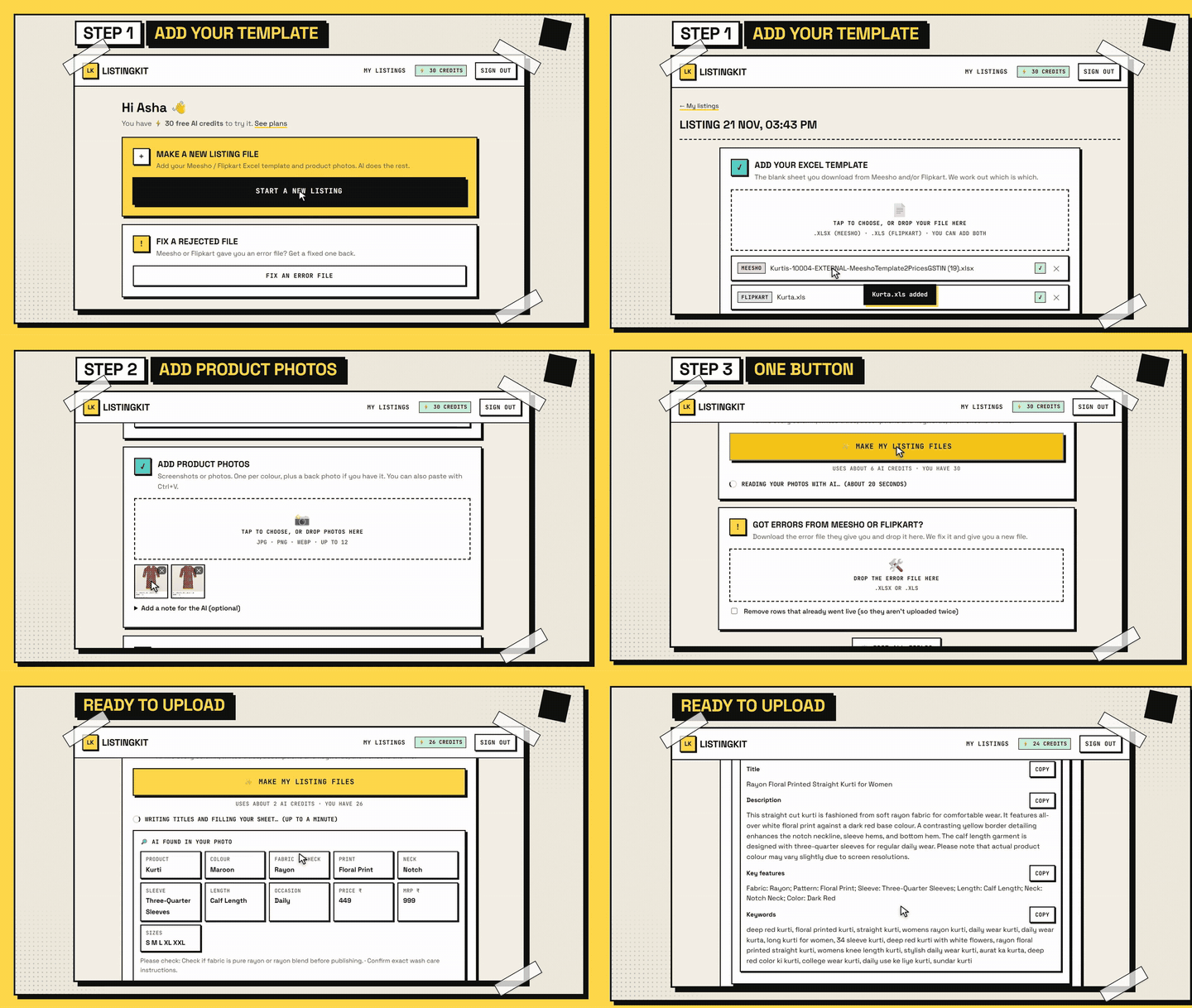
You don't fill any form. The AI looks at your photo and your template and does the typing.
- 1
Add your Excel template
Download the blank category template from the Meesho supplier panel or Flipkart Seller Hub and drop it in. Add both if you sell on both. We work out which is which.
- 2
Add product photos
A screenshot or photo per colour, plus a back photo if you have one. The AI reads fabric, colour, print, neck, sleeve, length, sizes, and even the price if it's on the screenshot.
- 3
Download ready files
Press Make my listing files. You get the same template back, every column filled and checked, with the same file name and format. Upload it straight to the marketplace.
Everything a careful cataloguer would do, done for you
Reads your product photo
Detects category, fabric, colour, pattern, neck, sleeve and length, and tells you what to double-check.
Fills every column
Dropdowns matched to each template's exact spelling, Group IDs, SKUs, size chart, prices, HSN and GST.
SEO titles & keywords
Unique titles and descriptions per colour, plus English and Hinglish search keywords buyers really type.
Checked before you upload
Mandatory fields, dropdown values, banned words and duplicate titles are checked, with problems listed in plain words.
Fixes rejected files
Drop the error file the marketplace gives you. It reads every message, fixes what it can and asks only what it can't.
Learns from rejections
When a marketplace flags a new word, it's added to the rules so the next listing avoids it.
Listing copy written the way each marketplace ranks
Meesho shows short names in a visual feed, so the product name is 5 to 10 buyer-friendly words. Flipkart builds the title from attributes, so you get a strong Model Name and key features. No hype words, and no claims your photo can't prove.
- Unique text for every colour, never copy-pasted
- Keywords grouped: main, long-tail, Hinglish, occasion
- Copy buttons for every field
Rayon Printed Straight Kurti for Women
This straight-cut kurti is made from rayon fabric with a smooth drape that stays comfortable through long wear. The deep red base carries a white floral print, and a golden border at the hem adds a neat finish. A go-to daily wear kurti for women; pair it with leggings, palazzos or churidar. Colour may vary slightly on different screens.
kurti for womenrayon kurtidaily wear kurtiladies kurtistraight kurtifloral print kurti
By hand vs ListingKit
| By hand | ListingKit | |
|---|---|---|
| Fill attributes and dropdowns | Type and search every row | AI fills from your photo |
| Titles and descriptions | Copy-paste, often duplicated | Unique, SEO-friendly per colour |
| Meesho + Flipkart | Do it twice, different spellings | Both files at once, each in its own format |
| Before upload | Hope it passes | Quality check with problems listed |
| After a rejection | Decode the error sheet yourself | Drop it in, get a fixed file |
Drop the error file. Get a fixed one back.
ListingKit reads every error message, groups them, fixes banned words, wrong dropdown values, blanks and duplicates, and only asks you about things it truly can't know. It can also clear rows that already went live, so nothing is uploaded twice.
Try it freeSimple plans with AI credits included
A typical listing (2 photos, Meesho + Flipkart) uses about 6 credits. Start with 30 free credits.
Monthly
- 300 AI credits
- About 50 AI listings
- Meesho & Flipkart files
- Quality check + error-file fixing
3 Months
- 1000 AI credits
- About 166 AI listings
- Meesho & Flipkart files
- Quality check + error-file fixing
Yearly
- 4500 AI credits
- About 750 AI listings
- Meesho & Flipkart files
- Quality check + error-file fixing
Questions sellers ask
Which categories does it work with?
Any Meesho or Flipkart bulk-listing template. ListingKit reads the columns, mandatory fields and dropdown lists from the file you upload, so it adapts to each category. It has been tested most on women's fashion such as kurtis and tops.
Do I still need image links?
Yes. Marketplaces need web links to your photos, which you can create with the image link tool in the Meesho supplier panel. Your screenshots are what the AI reads to fill the listing; you can paste the hosted links in “Edit all fields”.
What if the AI gets something wrong?
Before you upload, ListingKit shows what to double-check (for example the exact fabric). You can change any field under “Edit all fields” and make the files again. Only list what's true about your product.
What is an AI credit?
Each AI action uses a few credits: reading a photo, writing a listing for a platform, or fixing an error file. Making files without AI, and rule-based error fixes, are free. Your balance is always shown at the top of the page.
Do credits expire?
Credits that come with a plan last until the plan ends. Top-up credits and your free sign-up credits never expire.
Will my file look the same?
Yes. You get your own template back with the same file name and format (.xls stays .xls), with its dropdowns and sheets kept.
Is ListingKit made by Meesho or Flipkart?
No. ListingKit is an independent tool for sellers and is not affiliated with Meesho or Flipkart.
List your next catalog in minutes, not hours
Upload a template and a photo. Try it free with 30 AI credits, no card needed.
Start free